
Recipes missing on one device — sync issues
Forktastic syncs your recipes, cookbooks, meal plans, grocery list, and family memberships across every device you sign in on. When something is missing on one device but visible on another, the issue is almost always one of three things: wrong account signed in, stale local cache, or temporary backend lag.
Step 1 — Check you’re on the same account
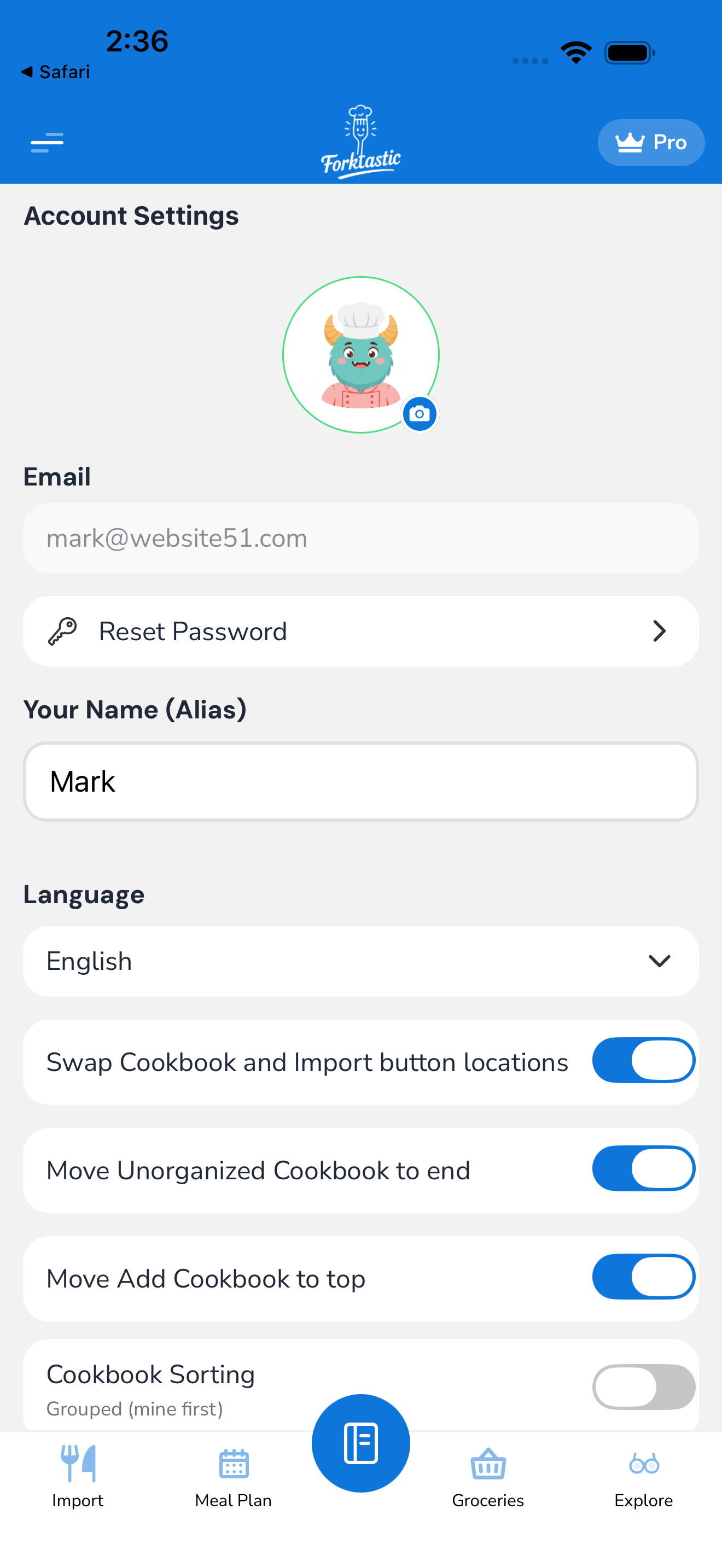
Sign-in confusion is by far the most common cause.
- On both devices, open Options → Account settings.
- Check the email at the top.
- If the two devices show different emails, that’s your answer — they’re separate accounts. Sign out on the device showing the wrong account and sign in with the right email.
If the emails match but recipes are still different, continue to Step 2.
Step 2 — Force a re-sync
Local cache can get stale. Forcing a re-sync usually fixes it.
Method A — pull-to-refresh
- Open the Cookbook tab.
- Pull down from the top of the list (the standard mobile refresh gesture).
- A spinner shows briefly.
- Check whether the missing recipe is now there.
This re-fetches the cookbook list from Forktastic’s backend.
Method B — sign out and back in
If pull-to-refresh doesn’t help:
- Options → Account settings → Sign out.
- Sign back in with the same email.
- Forktastic re-fetches everything from scratch.
This clears all local cache and forces a fresh download.
Method C — Clear cache (settings)
A milder version of sign-out — clears caches without signing you out:
- Options → Account settings → Advanced → Clear cache.
- Confirm.
- The app reloads its local data from the backend.
Step 3 — Wait for backend lag
If you just made a change on Device A (added a recipe), it can take a few seconds to a minute to appear on Device B. Sync isn’t instant, especially across continents.
If it’s been more than 5 minutes, that’s not normal lag. Try Step 2.
Step 4 — Check the recipe’s actual location
Sometimes a recipe isn’t missing — it’s in a different cookbook than you think.
- On the device where you can see the recipe, open it.
- Note which cookbook it’s in (shown in the recipe header).
- On the device where it’s “missing,” open that specific cookbook directly.
Recipes in Unorganized are easy to overlook; check there too.
Step 5 — Family-shared vs personal
If you’re in a family group, family-shared recipes appear in your Family section of the Cookbook tab — not in your personal cookbooks.
If a recipe is missing on Device A but visible on Device B, check whether:
- It’s in your personal cookbook on Device B (synced — should be everywhere)
- It’s in your family section on Device B (then it’s a family-shared recipe; should also be everywhere if you’re in the family)
Step 6 — What’s actually synced vs. what isn’t
For reference, here’s what syncs and what doesn’t:
Synced across devices:
- Recipes (all data)
- Cookbooks (structure + memberships)
- Meal plans
- Grocery list (across devices on same account)
- Family memberships
- Notes on recipes
- Ratings and reviews
- Followed cookbooks
- Saved inventory from Photo Match
- Account settings (language, theme, units)
Not synced (device-local):
- Cook Mode resume state (where you left off in a recipe)
- App lock biometric requirement (per-device)
- Notification history (per-device, but events are server-sourced)
- Recently-viewed list (per-device)
If something you expected to sync is in the “not synced” list, that’s by design.
Step 7 — Network issues
If sync seems perpetually broken, you might be on a network blocking Forktastic’s backend.
- Try a different network. Switch from Wi-Fi to cellular (or vice versa) and see if sync resumes.
- Corporate / VPN networks sometimes block Forktastic’s domain. Disable VPN momentarily.
- Captive portals (hotel Wi-Fi) without login appear connected but block traffic. Open a browser and confirm you can actually load
forktastic.com.
Step 8 — Multiple recipes missing or out of sync
If many recipes (not just one) are missing or out of date:
- Run a full re-sync (Step 2, Method B).
- Wait 1–2 minutes.
- Check again.
If you still have widespread missing data, that’s potentially a backend issue. Email support@forktastic.com with:
- Your account email
- How many recipes are missing approximately
- Which devices show what
- Approximate timestamp of when the issue started
Forktastic’s backend has rollback / replay capabilities for sync-failure scenarios; support can investigate.
Sync diagnostics
For tech-curious users, the app has a sync status indicator:
- Options → Account settings → Advanced → Sync status.
- Shows last sync timestamp, last error (if any), and a real-time sync log.
This is useful when reporting issues to support — include a screenshot.
Related
- Settings & account — sign-out, cache clearing
- Create your account — including multiple-device setup