
Restore purchases
If you have an active Forktastic Pro subscription but Pro features aren’t working — for example, after reinstalling Forktastic, restoring from an iCloud backup, or signing in on a new device — use Restore purchases to re-link your subscription.
This is a common need on iOS and Android because app stores tie subscriptions to your store account (Apple ID, Google account), and Forktastic needs to ask the store “does this user have an active Forktastic subscription?”
Run Restore purchases
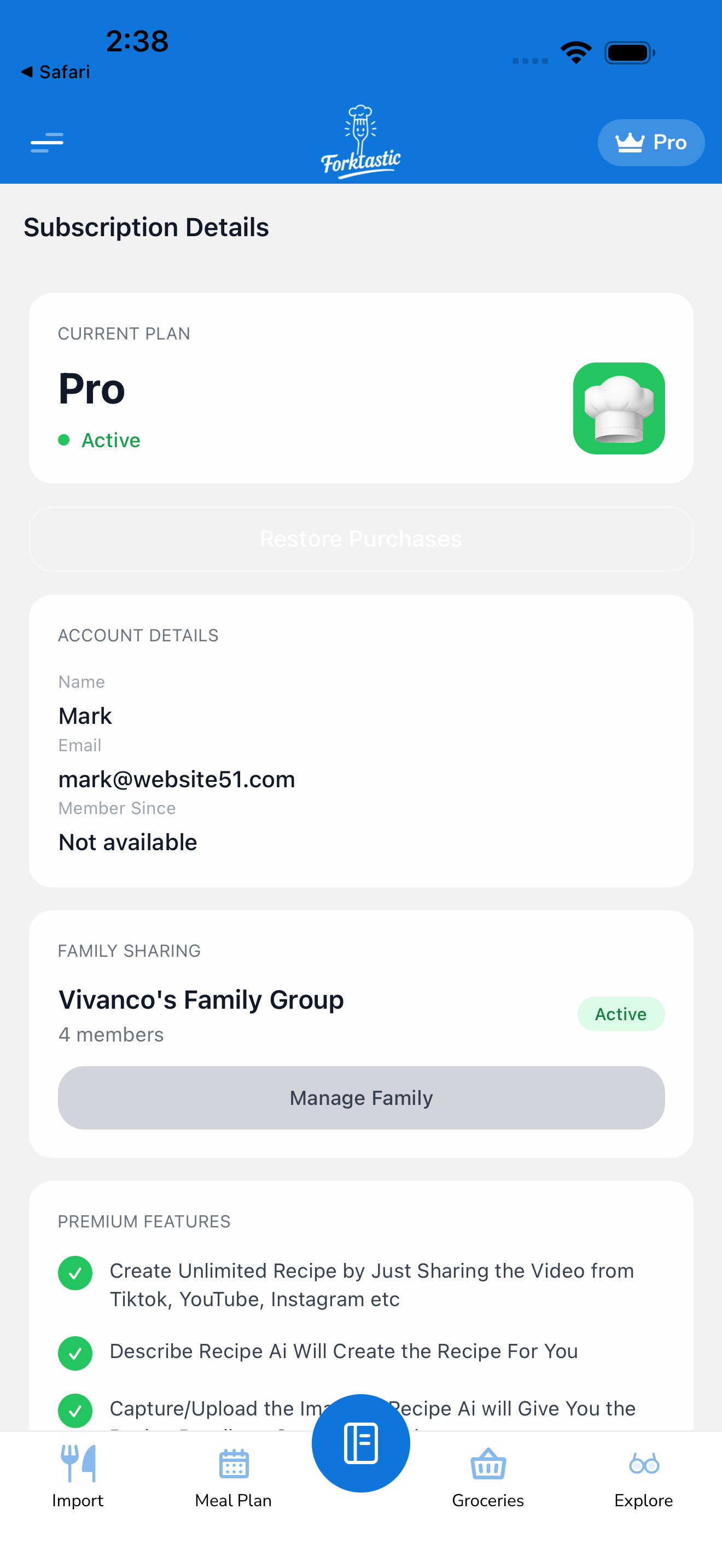
- Open Options → Subscription details.
- Tap Restore purchases.
- Forktastic queries Apple / Google / Stripe for active subscriptions on your store account.
- If a Forktastic Pro subscription is found, Pro features activate within a few seconds.
- A confirmation appears: “Pro subscription restored.”
If nothing is found, you’ll see “No active subscription on this account.” This either means:
- You don’t actually have an active subscription (check your billing history in the store).
- You’re signed into a different store account than the one that purchased — see below.
Make sure you’re signed into the right account
The most common cause of failed restore: you bought Pro on Apple ID A, and your device is currently signed into Apple ID B.
iOS
- Check which Apple ID your device uses: Settings → Your name (top of Settings).
- If wrong, you can either switch Apple IDs (signs you out of your iCloud) or restore on a device using the correct Apple ID.
Android
- Check Play Store → Account → which Google account is shown.
- Switch in the top-right account picker.
Web
Web subscriptions are tied to your Forktastic account email, not a store account. As long as you’re signed into the right Forktastic email, Pro should auto-activate without a manual restore.
Restore vs re-subscribe
These are different:
- Restore — you have an active subscription on your store account; just re-link it to Forktastic on this device. Doesn’t charge you anything.
- Re-subscribe — you don’t have an active subscription; you sign up again (and pay again).
If you’re not sure which case you’re in: try Restore purchases first. If it finds nothing, then re-subscribe from the paywall.
”Subscription found but not active”
A weird state that occasionally happens: your store has a subscription record but says it’s expired or cancelled.
Possible causes:
- A previous trial that ended without converting (you used the trial, didn’t pay, no longer Pro).
- A subscription you cancelled mid-cycle (it’s still “active” until the end of the period; check the renewal date).
- Billing failures (see Manage your subscription → What happens if you stop paying).
In these cases, the restore correctly tells you there’s no active subscription — Pro features stay off. You’d need to re-subscribe.
Cross-platform restoration
Subscriptions don’t transfer across platforms automatically. For example:
- You subscribed on iOS → that subscription is tied to your Apple ID. Restoring on Android won’t find it (Android only knows about Google Play subscriptions).
- You subscribed on web → restoring on iOS/Android won’t find it; it’d find it only via Stripe.
If you want Pro on multiple platforms:
- Same Apple ID across all your iOS devices — automatic; no restore needed beyond the initial sync.
- Same Google account across all your Android devices — same.
- iOS + Android + Web — your subscription is technically only on one of those. Forktastic syncs Pro entitlement across platforms based on your Forktastic account, so as long as you’re signed in with the same Forktastic email, Pro is active on all platforms regardless of where the underlying subscription lives.
This last point — “Pro entitlement syncs based on Forktastic email” — is the key. Restore is only needed when the chain breaks between store and Forktastic (e.g., after reinstall, fresh device, lost iCloud session).
When Restore doesn’t help
Sometimes the issue isn’t restoration but a stale local cache:
- Sign out of Forktastic (Options → Account settings → Sign out).
- Force quit the app.
- Re-open and sign in.
- Tap Restore purchases again.
This forces a full re-sync of your Pro entitlement.
If after all this Pro still isn’t active and you’re sure you have a subscription, email support@forktastic.com with your account email and a screenshot of your store subscription record.
Related
- Upgrade to Pro
- Manage your subscription
- Cancel
- Restore purchases not working — troubleshooting