
Delete your account
If you want to permanently leave Forktastic, you can delete your account directly from inside the app. Deletion removes your data from Forktastic’s systems entirely (after a 30-day grace period).
Cancelling your Pro subscription is different from deleting your account — see Cancel for subscription-only changes.
Before you delete
A few things to consider:
- Export anything you want to keep first. Make a PDF cookbook of your favorite recipes. Once the grace period ends, your data is gone.
- You’ll be removed from family groups you’re a member of. If you’re the family creator, the family group is dissolved 30 days after you start deletion (other members keep their personal cookbooks).
- Your Pro subscription is automatically cancelled on deletion. No partial refund of the current billing period (refunds require contacting Apple/Google/Stripe — see Cancel).
- Public cookbooks you’ve shared are removed from Explore. Followers lose access. Saved copies in other users’ cookbooks are unaffected (those are independent copies).
- Family activity feed history is removed; your past contributions to shared cookbooks remain in those cookbooks (since they belong to the cookbook owner, not you).
Delete the account
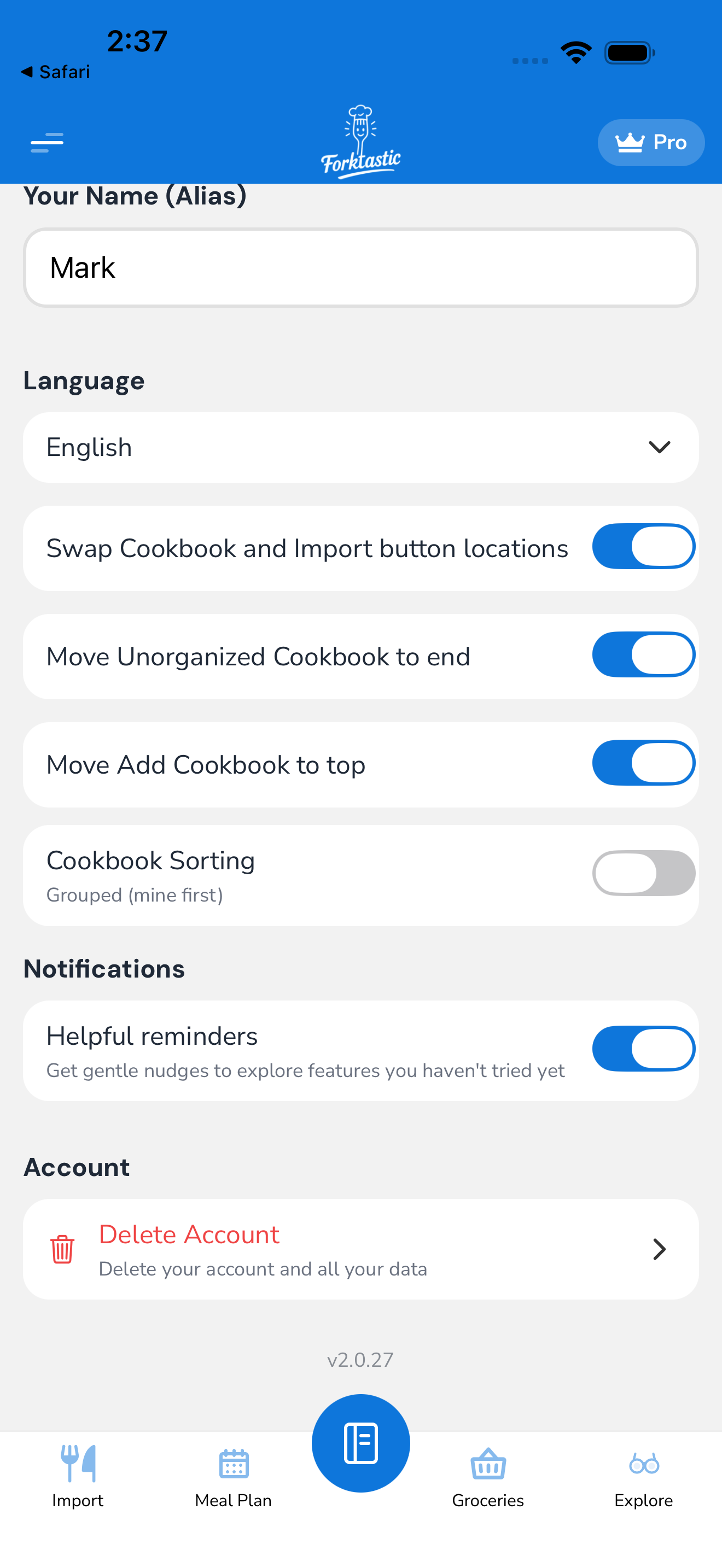
- Open the Options tab.
- Tap Account settings.
- Scroll to the very bottom.
- Tap Delete account (red button).
- Confirm step 1: you’re shown what’ll be deleted (recipe count, cookbook count, family memberships). Read it.
- Confirm step 2: enter your account email to confirm.
- Confirm step 3: enter your password (or confirm with Apple/Google if social auth).
- Tap Delete account permanently.
The account enters a 30-day grace period state.
The 30-day grace period
For 30 days after starting deletion:
- The account is suspended — you can’t sign in, recipes can’t be viewed, Pro features are off.
- The data is retained but inaccessible to anyone (including Forktastic staff).
- You can come back by signing in within the grace period — Forktastic sends a one-time link to your email allowing you to cancel the deletion. Sign-in restores the account fully.
- Family members who had access via you lose access immediately at deletion start (not 30 days later). The 30-day window is for you, not for them.
After 30 days, the data is permanently deleted.
What “permanently deleted” means
After the grace period ends:
- All your recipes, cookbooks, meal plans, grocery lists, family group memberships, ratings, reviews, notes, photos: deleted.
- Backups and replicas are purged within 7 days of permanent deletion.
- Your account email is freed for a new signup, if you (or someone else with the same email) wants to use it.
- Forktastic retains only: anonymized usage statistics that can’t be linked back to you, and any transaction records required by law (typically tax/financial records for a few years).
If you change your mind
During the grace period:
- Sign in normally with your email and password (or Apple/Google).
- Forktastic detects the pending deletion and shows: “Your account is scheduled for deletion. Cancel?”
- Tap Cancel deletion.
- The account reactivates fully — recipes, cookbooks, everything.
After the grace period: there’s no way to recover. You’d need to start fresh with a new account.
Deletion vs leaving family groups
If you just want to leave family groups (not delete your whole account):
- See Remove a family member for the leave-a-family flow.
Leaving a family doesn’t affect your personal account or your private cookbooks.
Privacy of data during the grace period
During the 30-day grace period:
- Forktastic doesn’t process your data for any new purpose.
- Internal staff don’t have access to your data even with admin tools (a deletion-pending flag locks the account).
- Backups continue to include your data until day 37 (30-day grace + 7-day backup purge cycle), at which point they’re scrubbed.
This is GDPR-compliant for users in EU jurisdictions. Forktastic applies the same standard globally regardless of where you live.
CCPA, GDPR, and data export
Before deleting, you can request a full export of your data:
- Options → Account settings → Privacy → Export my data.
- Forktastic generates a ZIP containing your recipes (JSON + images), cookbooks (JSON), meal plans (JSON), and account metadata.
- The ZIP is emailed to your account email within 24 hours.
This export is independent of deletion — you can request it at any time, and you can do it before deleting to have a permanent personal copy.
Related
- Cancel — for canceling Pro only
- Remove a family member — for leaving family groups only
- Settings & account — main settings hub